> ## Documentation Index
> Fetch the complete documentation index at: https://pioneer-kelton-add-decoder-inference-prices.mintlify.site/llms.txt
> Use this file to discover all available pages before exploring further.
# OpenCode
> Connect the OpenCode CLI or desktop app to Pioneer to route model calls, switch between 70+ models, and optionally enable Exa-powered web search.
## Setup steps
**Integrate OpenCode CLI with Pioneer:**
1. Download and [set up](https://opencode.ai/download) the OpenCode CLI.
2. Sign into Pioneer and get your API key from [agent.pioneer.ai/api-keys](https://agent.pioneer.ai/api-keys)
3. In a fresh terminal, start OpenCode. Include `OPENCODE_ENABLE_EXA=1` if you want web search (OpenCode disables it for custom providers by default):
```bash theme={null}
OPENCODE_ENABLE_EXA=1 opencode
```
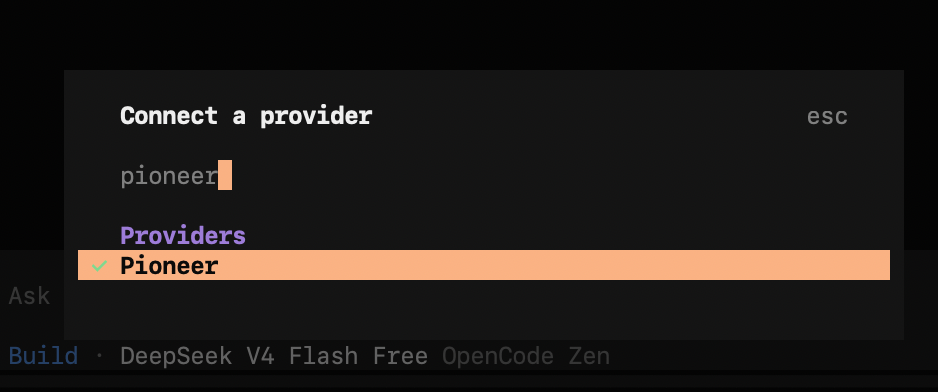
4. Type `/connect` and select `Pioneer` from the drop-down list.
5. Add your Pioneer API key.
6. Choose `Pioneer Auto` to use Pioneer's model router. Learn more about our model router [here](/concepts/router).
7. To switch between models, use the `/models` command and select one from our catalog of 70+ models (and growing).
Web search runs through OpenCode's built-in Exa tool when `OPENCODE_ENABLE_EXA=1` is set. Allow the `websearch` permission if OpenCode prompts for it. Omit the flag to keep search off.
**Integrate OpenCode Desktop app with Pioneer:**
1. Download and install OpenCode Desktop app
2. In the app: go to Settings → Providers → Pioneer
3. Enter your Pioneer API key
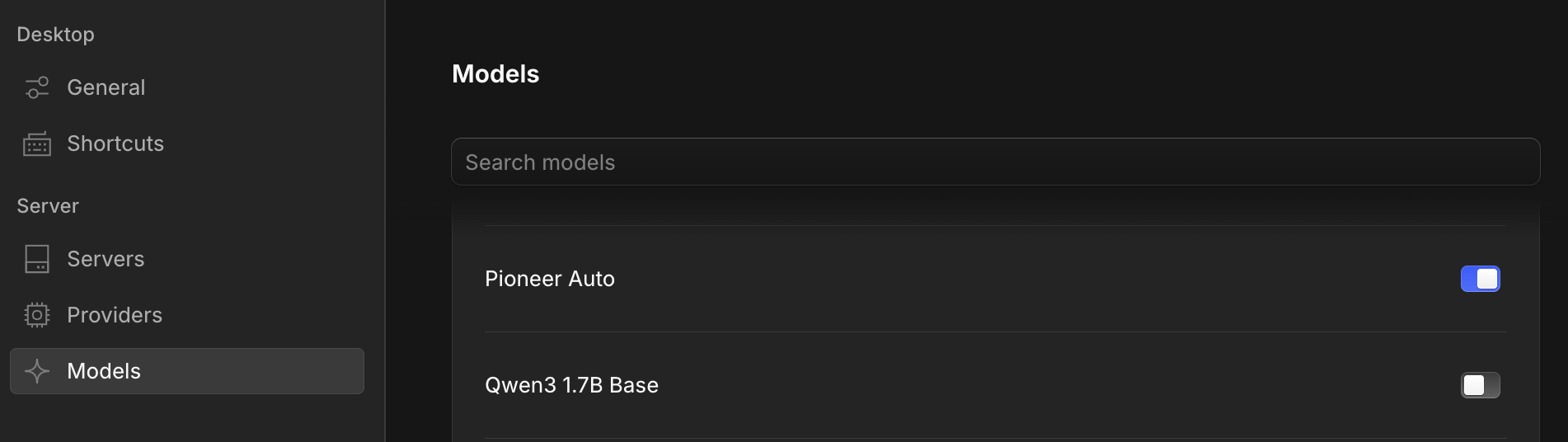
4. In Settings → Models: toggle on the models available in Pioneer model catalog that you'd like to use. Make sure to toggle on `Pioneer Auto` if you'd like to use Pioneer's model router.
 5. Add your Pioneer API key.
6. Choose `Pioneer Auto` to use Pioneer's model router. Learn more about our model router [here](/concepts/router).
7. To switch between models, use the `/models` command and select one from our catalog of 70+ models (and growing).
Web search runs through OpenCode's built-in Exa tool when `OPENCODE_ENABLE_EXA=1` is set. Allow the `websearch` permission if OpenCode prompts for it. Omit the flag to keep search off.
**Integrate OpenCode Desktop app with Pioneer:**
1. Download and install OpenCode Desktop app
2. In the app: go to Settings → Providers → Pioneer
3. Enter your Pioneer API key
4. In Settings → Models: toggle on the models available in Pioneer model catalog that you'd like to use. Make sure to toggle on `Pioneer Auto` if you'd like to use Pioneer's model router.
5. Add your Pioneer API key.
6. Choose `Pioneer Auto` to use Pioneer's model router. Learn more about our model router [here](/concepts/router).
7. To switch between models, use the `/models` command and select one from our catalog of 70+ models (and growing).
Web search runs through OpenCode's built-in Exa tool when `OPENCODE_ENABLE_EXA=1` is set. Allow the `websearch` permission if OpenCode prompts for it. Omit the flag to keep search off.
**Integrate OpenCode Desktop app with Pioneer:**
1. Download and install OpenCode Desktop app
2. In the app: go to Settings → Providers → Pioneer
3. Enter your Pioneer API key
4. In Settings → Models: toggle on the models available in Pioneer model catalog that you'd like to use. Make sure to toggle on `Pioneer Auto` if you'd like to use Pioneer's model router.